The request
A change request lands on a schema you did not write. Rename this column, change the type of that one, drop this index. Four hundred tables, no documentation, and the team that built it left two years ago.
The first thing everybody opens is the Dependencies view in SSMS. It is good work and it does exactly what it says: it lists the modules that contain a reference to the object you selected. The trouble is that it answers a different question than the one in front of you. You did not ask which modules mention Orders. You asked which ones stop working.
On a clean schema the two questions nearly coincide. On a legacy one they drift apart, for a mechanical reason: a trigger's dependencies are recorded against the trigger, not against the procedure that writes the table the trigger sits on. SQL Server holds the reference, but it is attached to the object you were not looking at.
The example
Here is the procedure that places an order, from the demo database that ships with SQL Wayfarer. That database has five tables, one procedure and two triggers, and it reproduces exactly this chain.
CREATE PROCEDURE dbo.usp_PlaceOrder
    @CustomerID INT,
    @ProductID  INT,
    @Quantity   INT
AS
BEGIN
    SET NOCOUNT ON;
    INSERT INTO dbo.Orders (CustomerID, ProductID, Quantity)
    VALUES (@CustomerID, @ProductID, @Quantity);

    UPDATE dbo.Inventory
    SET Quantity = Quantity - @Quantity
    WHERE ProductID = @ProductID;
END;
Two tables, both written. That is all the dependency view can show you here.
These are the two DML triggers sitting on them:
CREATE TRIGGER dbo.trg_Orders_UpdateStats ON dbo.Orders
AFTER INSERT
AS
BEGIN
    SET NOCOUNT ON;
    MERGE dbo.CustomerStats AS target
    USING (SELECT CustomerID FROM inserted) AS src
    ON target.CustomerID = src.CustomerID
    WHEN MATCHED THEN
        UPDATE SET TotalOrders = TotalOrders + 1, LastOrderAt = SYSUTCDATETIME()
    WHEN NOT MATCHED THEN
        INSERT (CustomerID, TotalOrders, LastOrderAt) VALUES (src.CustomerID, 1, SYSUTCDATETIME());
END;
CREATE TRIGGER dbo.trg_Inventory_LowStock ON dbo.Inventory
AFTER UPDATE
AS
BEGIN
SET NOCOUNT ON;
INSERT INTO dbo.AuditLog (Message)
SELECT 'Inventory updated for ProductID ' + CAST(ProductID AS NVARCHAR(10))
FROM inserted;
INSERT INTO dbo.LowStockAlerts (ProductID)
SELECT ProductID FROM inserted WHERE Quantity < 5;
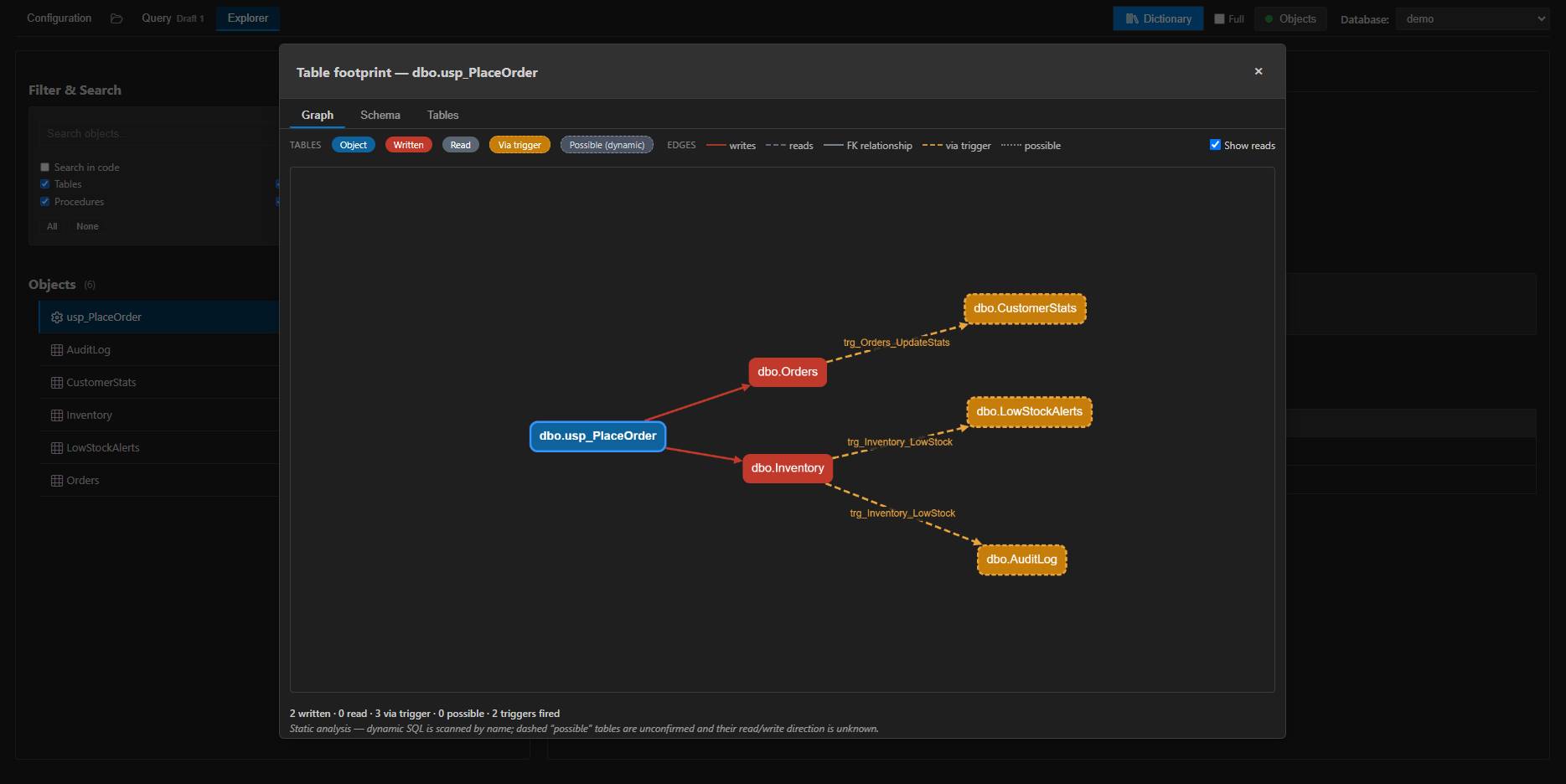
END;The first one merges into dbo.CustomerStats. The second writes to dbo.AuditLog and dbo.LowStockAlerts. So the procedure writes to five tables, and three of them appear nowhere in its own text. Rename a column in CustomerStats or change its type, and usp_PlaceOrder breaks, through a trigger, on a table whose name has nothing to do with customer statistics.
The chain is four hops long and the first hop is the only one the tools show you.
What I built
That is the hop SQL Wayfarer is for. Open any procedure, and the Table Footprint follows the whole chain: it reads the trigger body, continues through nested procedure, function and view calls, and gives you the transitive set of tables the module really touches. The tables reached through a trigger are marked separately from the ones your own code writes to.
Then I wanted the same answer per column, because that is the granularity the change request actually has. For every column of every table, the extension records which objects read it and which ones write it. The Structure tab shows a Used by badge next to each column, so you see which objects read it before you rename it.
Getting the columns right takes a few more steps. An alias has to be resolved to the table it belongs to, a CTE name has to be excluded so it does not pollute the lineage of every table in the statement, a MERGE target has to be found even though it is not in the shape of the statement, and the inserted and deleted pseudo-tables have to be mapped back to the table the trigger sits on. I parse the T-SQL with the grammar Microsoft published with Babelfish rather than with regular expressions, because a regular expression cannot tell a comment from a string literal, and cannot tell a CTE name from a table name.
The documentation side came out of the same analysis. Tables, views, procedures and functions with their columns, keys, parameters and dependencies, exported as Markdown, with an ER diagram per table. On a schema nobody documented, that export is often the part people keep.
All of it runs inside VS Code. Nothing is installed on the server: the extension needs db_datareader and VIEW DEFINITION, reads the schema and the module definitions, and does the work in the extension host. The index is cached locally and refreshed incrementally, so the second time you open the database it is already there.
The cost is the parsing. The demo database indexes in 40 milliseconds. On a test schema of 400 tables and 1 500 modules, the first index takes 9 seconds and a refresh after one modified procedure takes 400 milliseconds. The extension shows the progress as it goes, and the job can be cancelled.
Where it stops
Encrypted modules cannot be read, because SQL Server does not return their definitions. They show up without dependencies.
Dynamic SQL is only matched by scanning the module text for known object names, so those edges are reported as possible with an unknown direction. When a column is unqualified in a statement that spans several tables, it is attributed to every table in scope and flagged as ambiguous. I chose recall over precision there, because dropping a reference silently would be worse than admitting the ambiguity.
And it is static analysis, so anything that depends on data at runtime, a table only touched by a job that runs at 3 a.m., is out of reach. It is also not a schema comparison tool. If your real problem is diffing staging against production, Redgate Dependency Tracker and ApexSQL do more than this and you should look at them.
Try it
SQL Wayfarer is free, MIT, and on the Marketplace. Add a connection, let it index the database, open a table you are about to change and look at the Used by badge on the column. Then open the footprint of the procedure that touches it, and see the tables only the triggers reach.
Microsoft retired Azure Data Studio on 28 February 2026 and pointed SQL Server developers at VS Code and the MSSQL extension. The dependencies view will still be the first thing you open, and it will still stop at the first hop.